


Other

HS20

The right setup for your business with HS20.

Designed for lasting durability and reliable, stable performance, the HS20 is ideal for demanding work environments such as retail, logistics and hospitality.
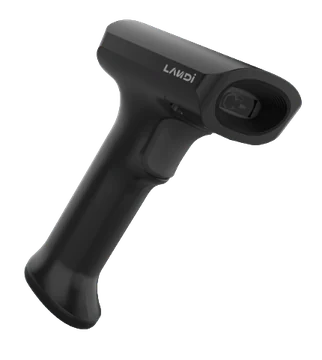
HS20 product view
Pluspay / Other20
01 Features

HS20— the details that make it different.

Design and hardware that simplify your daily workflow, in one device.

HS20 use case

System compatibility

Compatible with Android, Linux, Mac and Windows operating systems.

1D and 2D barcodes

Reads one- and two-dimensional barcodes.

IP42 protection

Features an IP42 protection rating.

Optional base

An optional base is available.

Convenient barcode scanning with HS20

With every scan speed and accuracy.

High performance

High performance with hardware-independent decoding.

Wide scanning range

Extended depth of field (DOF) for different scanning distances.

Fast, accurate scanning

Fast, highly accurate scanning, even for damaged or low-contrast barcodes.

Keyboard language support

Supports multiple keyboard languages.

Durable construction

Highly integrated construction for best-in-class durability.

Compatibility across systems

Full compatibility with multiple systems.

Keeps up with your business

Reliable performance in demanding environments.

Designed for lasting durability and reliable, stable performance, the HS20 is ideal for demanding work environments such as retail, logistics and hospitality.


RetailLogisticsHospitality
Barcode scanning with HS20 in a logistics operation
HS20 product image 1
HS20 product image 2
HS20 product image 3
HS20

The right addition to your business.

Apply now
02 Use cases

The right components. A complete workspace.

Evaluate checkout peripherals alongside the software and hardware you use. Plan connectivity and setup requirements from the start.

Explore industry solutions
HS20 usage scenarioExample usage image

Compatibility

Identify connectivity options for your existing hardware and applications.

Layout

Create a working setup that fits your counter space.

Installation

Set up your device and peripherals together.

03 Technical details

The power inside. In every detail.

HS20 hardware: explore the standard features and compare optional configurations.

Image sensor
CMOS
Pixels
640 × 480
Illumination
White LED
Aiming
Red LED
Supported barcodes
2D: PDF417, QR Code, Data Matrix, HanXin, Maxicode, postal codes, etc. 1D: Code128, UCC/EAN-128, AIM128, EAN-8, EAN-13, ISBN/ISSN, UPC-E, UPCA, Interleaved 2 of 5, ITF-6, ITF-4, Matrix 2 of 5, Industrial 25, Standard 25, Code39, Codabar, Code 93, Code11, Plessey, MSI-Plessey, RSS-14, RSS-Limited, RSS-Expand, etc.
Scanning resolution
≥3 mil
Typical depth of field (DOF)
5 mil Code 39: 20–170 mm 13 mil EAN: 30–350 mm 20 mil QR: 20–200 mm 10 mil DM: 15–120 mm 6.7 mil PDF417: 25–150 mm
Scanning angle
Pitch: ±60° Tilt: 360° Skew: ±60°
Field of view (FOV)
Horizontal: 40° Vertical: 30°
Dimensions
93 mm (depth) × 63 mm (width) × 166 mm (height)
Weight
138 g
Interface
USB
Housing material
PC + ABS
Notification
Buzzer, LED indicator
System interface
RS-232 serial interface USB keyboard USB virtual serial interface
Trigger method
Keyboard-triggered scanning Sensor-triggered scanning Continuous scanning
Operating voltage
5 V DC ±10%
Operating current
Standby: 50 mA Operating: 230 mA
Operating temperature
−20–50 °C
Storage temperature
−40–70 °C
Humidity
5%–95% (non-condensing)
Drop resistance
1.8 m
IP protection rating
IP42
Certifications
CE, FCC, RoHS
04 Installation

Get started in three steps.

Your journey with HS20, from application to everyday use.

Apply now
  1. 01Application

    Submit your application

    Tell us about your business, the number of devices you need and how you plan to use them.

    From you: a short application
  2. 02Planning

    Let’s plan your setup together

    Clarify software compatibility, connections and required peripherals with our team.

    Together: the right installation plan
  3. 03Getting started

    Check it and get started

    After installation, check the basic functions and connections to integrate your device into your workflow.

    Final step: usage check
HS20

Pricing

Device price

Get a quote

Request a current quote for your chosen device configuration and quantity.

Get a quote
HS20 product image
Business owner working on a computer in a bright officeLet's grow your business together.
Let's get started together

Tell us about your business.
Let’s find the solution together.

Discuss product selection, installation and application options for HS20 with our team.

Product selectionInstallationApplication
Talk to our team